AI Trading Prompt Engineering: The Complete Guide & Library
ChartLense Expert Prompt is a no-code prompt engineering environment built for traders. Write AI trading prompts that deliver laser-focused chart analysis tailored to your strategy—without writing a single line of code.
Whether you're a day trader using MACD and RSI, a swing trader analyzing support levels, or a position trader studying Bollinger Bands, mastering prompt engineering helps you get actionable insights without information overload.
Tell the AI exactly what to analyze, and get precise technical analysis signals—no noise, just the data you need for your trading decisions.
New to ChartLense? Start with Understanding Your Chart Analysis to learn what our AI analyzes by default, then return here to customize your results.
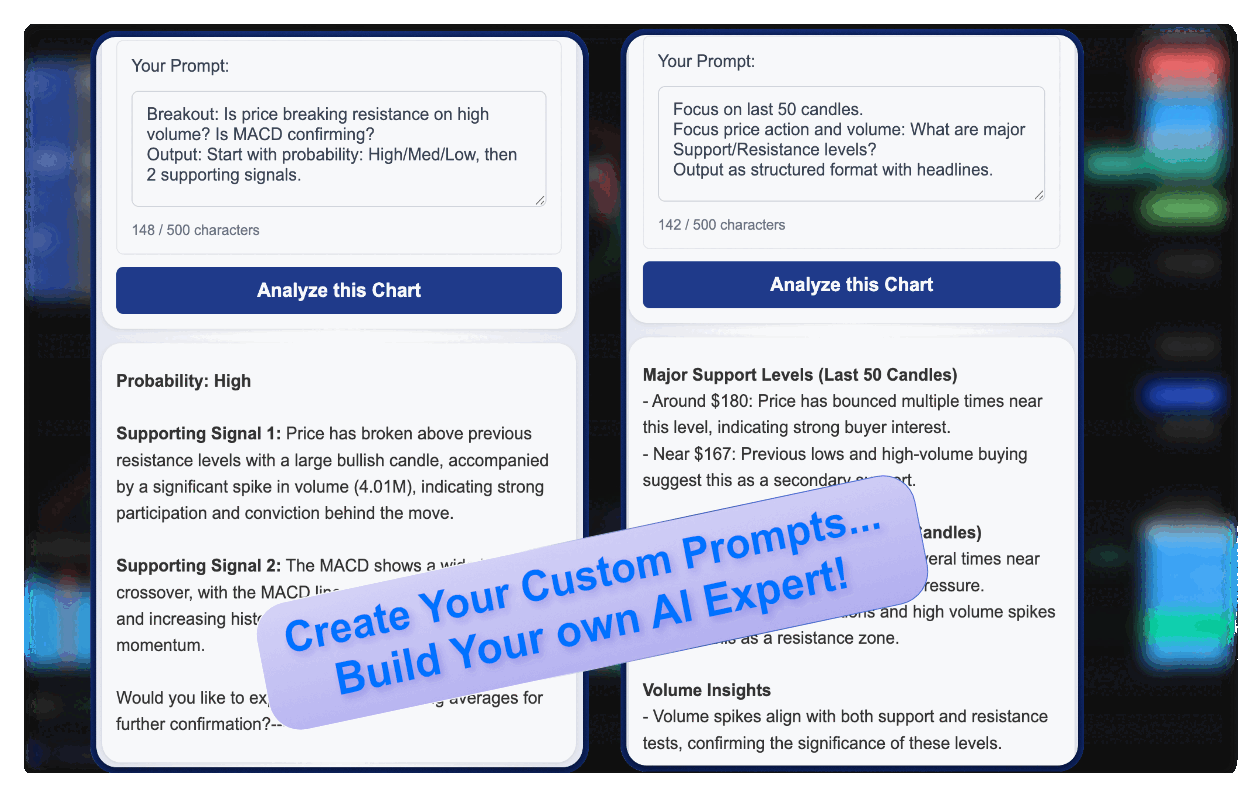
How Expert Prompts Work: Laser Focus, Zero Noise
Expert Prompts use focused analysis technology that concentrates entirely on what you ask—and intentionally omits everything else. This isn't a limitation; it's by design.
Ask about volume? Get volume. The AI dedicates its analysis to volume patterns, accumulation signals, and volume-price relationships. RSI, MACD, Fibonacci? Not mentioned in your prompt, not in your results.
Why this matters for traders:
- Faster decisions - No scrolling past irrelevant indicators
- Clearer signals - Deep analysis on what matters to YOUR strategy
- Natural discovery - Wonder about momentum? Just ask in your next prompt
The result: Each prompt becomes a focused lens on one aspect of the chart. Run multiple prompts to build a complete picture, or stay focused on your edge.
Example: Prompt "Check volume and accumulation" → You get detailed volume analysis (relative volume, buying pressure, accumulation zones). Want RSI too? Run another prompt—or combine them: "Check volume confirmation with RSI divergence."
📋 Try These First — Copy & Paste Starters
To construct the perfect AI trading prompt, follow this three-step formula: (1) Define the Focus, (2) Ask the Specific Question, and (3) Set the Output Format. Below are tested templates using this formula:
Focus: RSI momentum. Is there bullish or bearish divergence from price? Output: Signal + confidence level.Focus: Volume patterns. Is this accumulation or distribution? Output: Pattern type + key volume zones.Focus: MACD momentum. Is the trend strengthening or weakening? Output: Direction + histogram analysis.Focus: Support/resistance. What are the 3 strongest levels? Output: Price levels + reason for each.💡 Tip: Copy any prompt above, paste it into ChartLense, and see focused results instantly.
1. The Core Principle: Be Specific
The Prompt Engineering Formula:
Expert Prompt helps you cut through the noise to get the exact insight you need for your trading strategy.
Here's a real example showing how structured prompts lead to focused, actionable analysis:
Pro Tip: Start simple. Test one focused prompt, see the results, then iterate to refine your strategy.
Example: Breakout Analysis
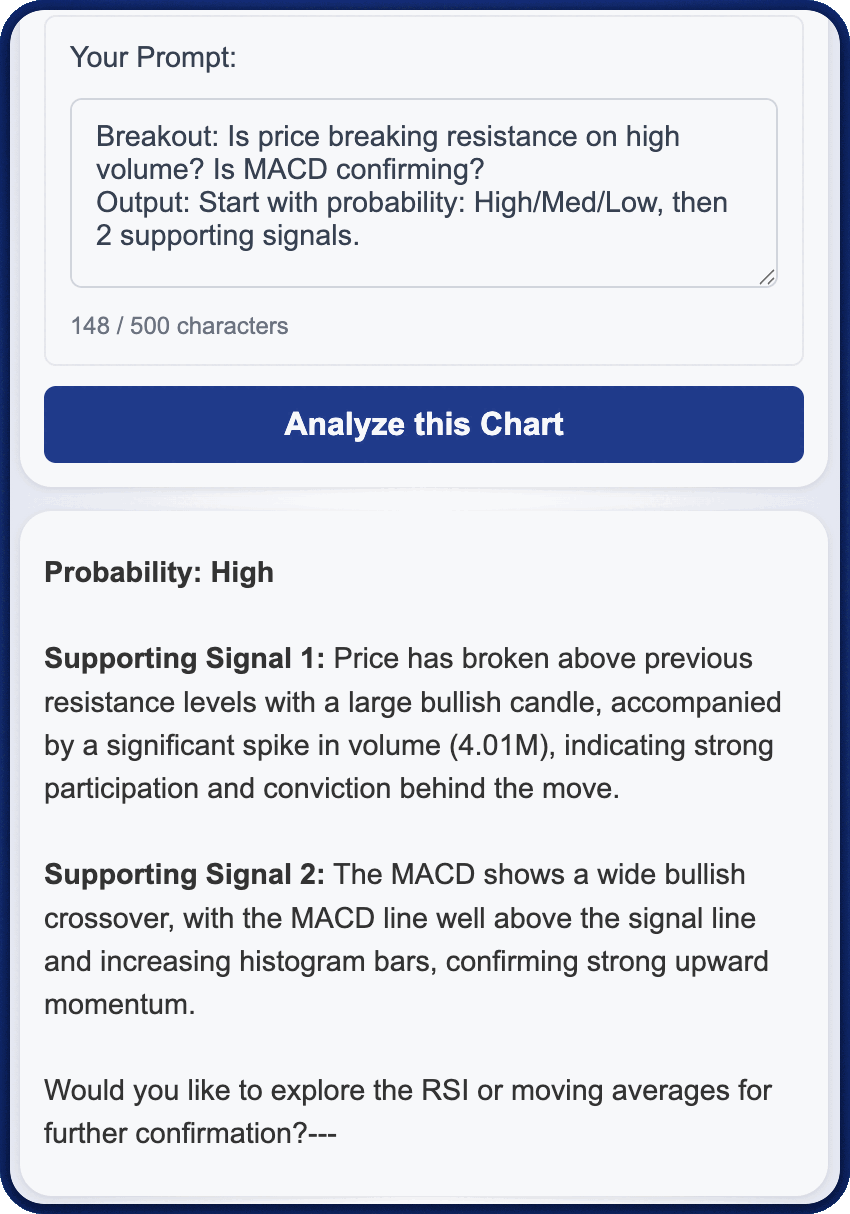
What makes this prompt effective:
- Clear Structure - Uses template format: Focus, Analysis question, Output format
- Focused Scope - AI concentrates on breakout mechanics with specific indicators
- Consistent Results - Requesting exact format ensures scannable, repeatable analysis
Key principles:
- Start with a Clear Goal
• Avoid:"Analyze the chart"
• Try this: "Focus on breakout confirmation with volume" - Name Specific Indicators
• Avoid:"Any buy signals?"
• Try this: "Is there a volume spike with MACD confirmation?"
Example: Risk Assessment Framework
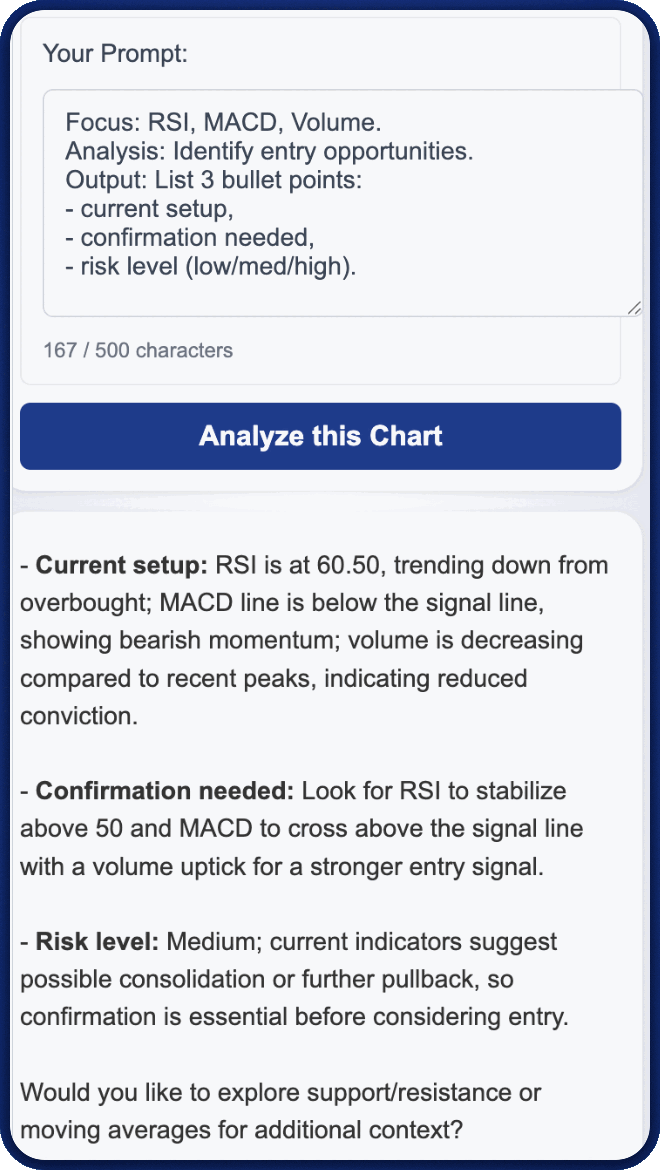
What makes this prompt effective:
- Creates standardized risk assessment: current setup, confirmation needed, risk level
- Explicit risk categorization (low/med/high)
- Consistent framework across all charts
- Perfect for traders who need to evaluate multiple opportunities quickly
Key principle:
- Ask Comparative Questions
• Avoid:"What is the risk level?"
• Try this: "Compare current risk to previous setups and categorize as low/med/high with confirmation criteria"
🎯 5-Minute Challenge: Discover Your Chart's Hidden Angles
Try this experiment on your next chart:
- Prompt #1:
Focus: RSI. Is momentum confirming or diverging from price action? Output: Bullish/bearish + strength. - Prompt #2:
Focus: Volume. Is this accumulation or distribution phase? Output: Pattern + notable spikes. - Prompt #3:
Focus: Price structure. What are the 2 key support and resistance levels? Output: Levels + reasoning.
What you'll notice: Each prompt reveals a completely different perspective on the same chart. That's the power of focused analysis—you control what the AI examines.
Most traders discover setups they would have missed with generic "analyze everything" requests.
2. Expert Prompts by Trading Style
Different trading styles require different analytical approaches. Here's how to customize your AI trading prompts for maximum effectiveness.
Expert Prompts for Swing Trading
Swing traders focus on capturing multi-day price moves and need prompts that analyze trend context with support and resistance levels. A well-crafted swing trading prompt combines trend identification using moving averages (50 EMA and 200 EMA) with entry signals at key support levels.
Effective Swing Trading Prompt:
"Identify the current trend using 50 and 200 EMA. Then analyze if price is pulling back to support with decreasing volume."
Why this works for swing trading:
- Combines trend context (EMAs) with entry signal (pullback to support)
- Includes volume confirmation to validate the setup
- Focuses on multi-day timeframe appropriate for swing trading
- Helps identify low-risk entry points in established trends
How it works:
The AI checks if the 50 EMA is above the 200 EMA (confirming uptrend) while price touches support—separating valid pullback entries from potential trend reversals.
AI Prompts for Day Trading
Day traders need fast, actionable signals that confirm momentum shifts within the trading session. Effective day trading prompts combine multiple technical indicators for high-probability setups while filtering false signals.
Effective Day Trading Prompt:
"Analyze price action around the VWAP (pink line). Is price rejecting or breaking through VWAP with volume confirmation? Identify if this is a mean reversion setup or trend continuation."
Why this works for day trading:
- VWAP acts as institutional reference point for fair value
- Price rejection at VWAP indicates mean reversion opportunities
- VWAP breaks with volume signal trend continuation
- Visual color reference (e.g. "pink line") helps AI identify correct indicator
- Combines price action with volume for high-probability intraday entries
Position Trading with AI Analysis
Position traders hold for weeks or months and need prompts that identify high-probability setup zones with clear risk parameters. These prompts should analyze consolidation patterns and volume trends that precede major moves.
Effective Position Trading Prompt:
"Analyze if price is consolidating near resistance with tightening Bollinger Bands and increasing OBV."
Why this works for position trading:
- Pattern recognition (consolidation) indicates potential breakout
- Bollinger Band squeeze signals volatility compression
- OBV (On-Balance Volume) confirms accumulation
- Identifies high-probability setups with clear entry zones
3. Common Mistakes and How to Fix Them
For best results: Expert Prompts work best with well-configured charts. Ensure your chart includes the indicators you want to analyze.
| Issue | Why It's a Problem | How to Fix |
|---|---|---|
| Too Vague | Generic prompts yield generic analysis with no actionable focus. | Be specific: "Analyze the strength of the current uptrend using ADX and price action." |
| Asking for Everything | Overloading with indicators creates information noise, not clarity. | Pick 2-3 indicators: "Focus on MACD momentum and Volume confirmation only." |
| No Context | Single-indicator questions miss the bigger picture. | Add context: "Is RSI overbought above 70 during a downtrend, suggesting potential reversal?" |
4. Understanding Plan Features
Custom Prompt Slots: Each slot lets you save a different prompt strategy. Switch between them instantly without retyping.
Character Limits: The maximum length of your custom prompt text. More characters allow for more detailed instructions and structured output requests.
Custom Prompt Features by Plan
Table: Custom Prompt Features Comparison by Subscription Plan
| Plan | Custom Prompt Slots | Character Limit | Best For |
|---|---|---|---|
| FREE | 1 slot | 100 characters | Testing a single focused strategy |
| STARTER | 2 slots | 250 characters | Day trading + swing trading strategies |
| PRO | 3 slots | 500 characters | Complete strategy library with detailed output control |
| TRADER | 3 slots | 900 characters | Advanced multi-indicator setups with comprehensive instructions |
Tip: Start with your most-used trading style. As you refine your prompt, you'll know if you need more slots or characters for additional strategies.
Frequently Asked Questions About AI Trading Prompts
What are AI trading prompts and how do they work?
AI trading prompts are custom instructions you give to ChartLense to focus the AI analysis on specific technical indicators or trading patterns. Instead of getting a generic overview of all chart elements, you tell the AI exactly what to analyze—like "Check for MACD divergence with volume confirmation"—and receive targeted insights for your strategy. This customization helps day traders, swing traders, and position traders get actionable signals without information overload.
How do I write an effective AI trading prompt for day trading?
Effective day trading prompts combine 2-3 specific indicators with clear context. Start with your goal (e.g., "breakout confirmation"), name exact indicators (MACD, RSI, volume), and specify the relationship between them. For example: "Is MACD showing bullish divergence while RSI is oversold below 30? Confirm with volume spike." This multi-indicator approach reduces false signals and gives you precise entry criteria for intraday positions.
What's the difference between Expert Prompts and default analysis?
Default analysis provides comprehensive chart overview covering all visible indicators, support/resistance levels, and trend context. Expert Prompts let you narrow the focus to specific elements relevant to your trading strategy. For instance, if you only trade MACD crossovers with volume, an Expert Prompt eliminates noise from other indicators and delivers laser-focused analysis on just those two elements.
Can I save multiple trading prompts for different strategies?
Yes. ChartLense offers multiple custom prompt slots depending on your subscription plan. FREE users get 1 slot, STARTER users get 2 slots, and PRO/TRADER users get 3 slots. This lets you save separate prompts for different strategies—one for swing trading pullbacks, another for day trading breakouts, and a third for position trading consolidation patterns—and switch between them instantly.
What indicators should I include in my custom prompts?
Focus on the 2-3 indicators central to your trading strategy rather than listing every possible indicator. Popular combinations include MACD + RSI + Volume for day trading, EMA crossovers + support/resistance for swing trading, and Bollinger Bands + OBV for position trading. The key is specificity: mention exact parameters like "RSI below 30" or "50 EMA crossing above 200 EMA" for clearer AI analysis.
How many characters do I need for effective trading prompts?
Most effective prompts require 100-250 characters. Simple focused requests like "Analyze MACD momentum and volume confirmation" work within the FREE plan's 100-character limit. More detailed instructions with output formatting ("Use numbered bullets with 3-word reasoning") need 250-500 characters available in STARTER and PRO plans. Advanced multi-indicator setups with comprehensive formatting instructions benefit from the TRADER plan's 900-character limit.
Start Using Expert Prompts Today
Every ChartLense user gets 1 free custom prompt slot with 100 characters—enough to test focused analysis on your favorite indicator combination.

Free to install. No credit card required.
Already using ChartLense? Open the extension, select "Custom" from the prompt dropdown, and start experimenting with your first focused prompt.
Next Steps
Ready to take your analysis further? Explore these related guides:
- Understanding Your Chart Analysis - Learn what the AI analyzes by default and how to interpret results
- Getting Better Results - Optimize your chart setup for more accurate analysis
- Improving Accuracy - Learn how AI confidence works and how to improve analysis quality
- Managing Your Account - Upgrade your plan for more prompt slots and characters