
Free AI Chart Analysis for TradingView
A free Chrome extension. Open any TradingView chart, click once, and get pattern detection, support/resistance, and indicator reads in five seconds. Nothing to screenshot or upload.
- 5 free analyses a day
- No credit card
- No chart knowledge needed
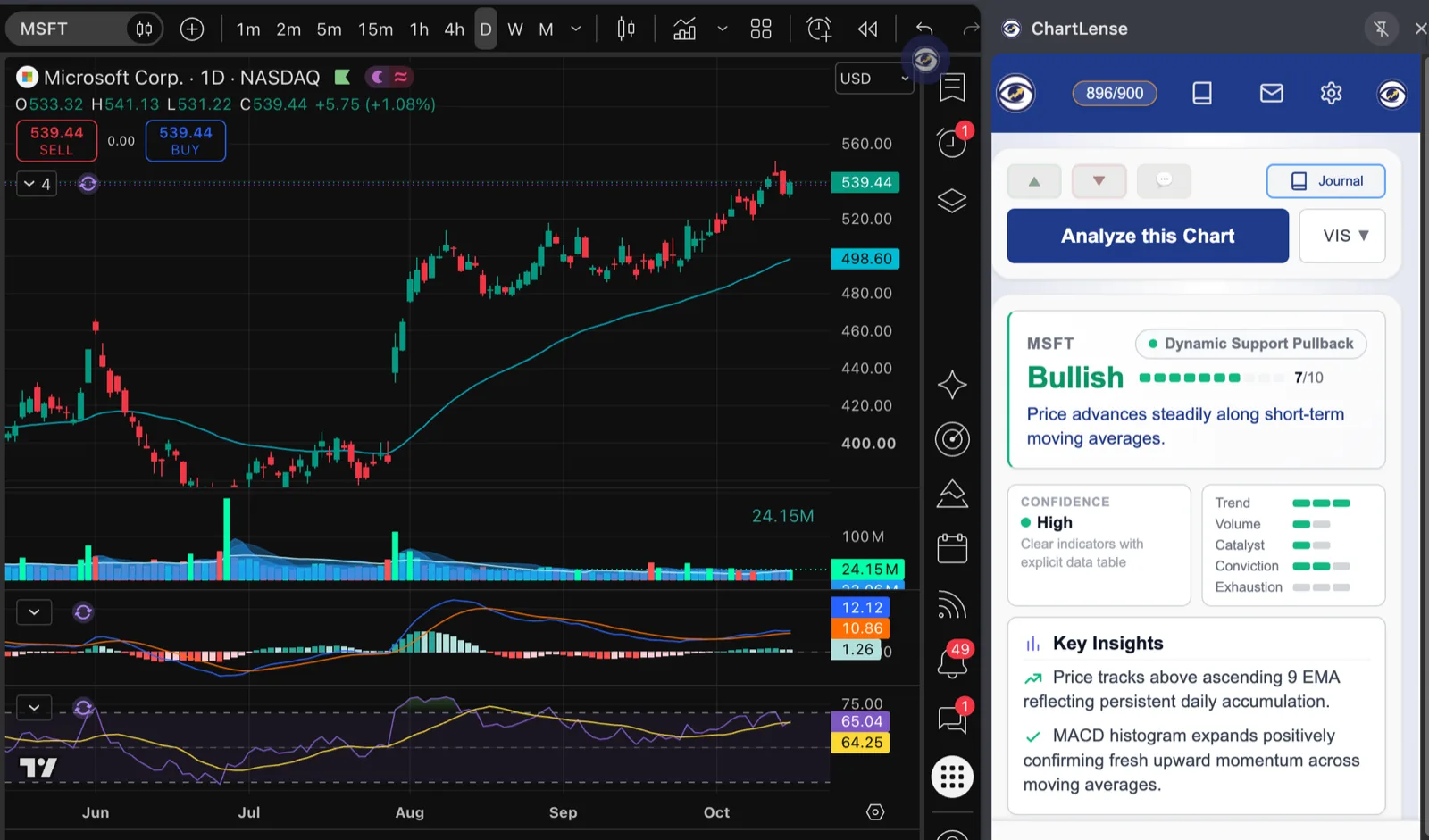
Read an AI chart analysis in 4 taps
This is a real result. Tap each part to see what it tells you.
How It Works in TradingView
- Add ChartLense from the Chrome Web Store and pin it to your toolbar.
- Open any chart in TradingView.
- Click the ChartLense icon. The sidebar opens with your analysis.
New to AI tools for TradingView? Read what a TradingView AI extension does and how to choose one.
What ChartLense Detects
Chart Patterns
Head and shoulders, double tops and bottoms, flags, wedges, triangles, channels, and major candlestick formations — each with a plain-English explanation.
Support & Resistance
Key horizontal levels, trendline support, and breakout zones — drawn directly from the visible price action and validated against recent swings.
Indicator Reads
MACD crossovers, RSI overbought/oversold zones, EMA alignment (9/20/200), Bollinger Bands, and volume profile — read directly off your chart.
Confidence Score
Every analysis includes a 0-10 confidence score reflecting how many technical signals align. Low scores tell you when the chart is ambiguous.
How ChartLense Compares
| Feature | ChartLense | ChatGPT (chart upload) | chartanalyst.ai |
|---|---|---|---|
| Works inside TradingView | Yes | No (manual upload) | No (separate site) |
| Free tier | Daily, no card | Limited free | Free with limits |
| Confidence score | Yes (0-10) | No | No |
| Auto journal of analyses | Yes | No | No |
Frequently Asked Questions
What is AI chart analysis?
AI chart analysis uses machine learning to read a trading chart the way a human technician would — identifying patterns, support and resistance, indicator signals, and trend direction. ChartLense returns a structured analysis with a confidence score in about five seconds.
Is ChartLense really free?
Yes. The free plan gives 5 AI chart analyses per day with no credit card. Paid plans start at $6.99 per month and give 350 to 1000 analyses per month, plus more custom prompts and watermark control. There is no trial countdown or hidden charge.
Does it work inside TradingView?
Yes. ChartLense is a Chrome extension that overlays on TradingView. Capture any chart and get an analysis without leaving the page. It also works on Binance, stock3, Yahoo Finance, and most broker chart platforms.
What patterns can ChartLense detect?
ChartLense detects common chart patterns including head and shoulders, double tops and bottoms, flags, wedges, triangles, and major candlestick formations. Each detection comes with a plain-English explanation and a confidence score.
How is this different from ChatGPT chart analysis?
ChatGPT requires you to screenshot, upload, and prompt manually. ChartLense lives in your browser — one click captures the live TradingView chart and returns a structured analysis with confidence scoring and an automatic journal entry.
Start Analyzing Charts in 30 Seconds
Install the Chrome extension. Open any TradingView chart. Click ChartLense.
Add to Chrome for Free